This week is Fix, Hack, Learn (FHL) at work (Microsoft), our internal week to chase a build we care about. Last FHL I worked on my agents and agentic loops, helping me scale myself and my work as a product manager. This time my project is personal, and it starts with a question I could not stop turning over: when a camera watches the front of my house, who owns what it sees?
The easy answer is a cloud camera. Buy the box, mount it, and every frame of my street, my face, and my neighbors streams to somebody else’s servers by default. The vendor owns the model, often owns the footage, and hands me back a rented view of my own front yard. I did not want the easy answer. I wanted the data, all of it, on hardware I own, labeled by a model I run, in a shape an AI can query later. That is the whole thesis behind this, and it is bigger than one camera: your own data is the moat, so catalog everything locally while you can.
I am calling the project Limen. It is the Latin word for threshold, the root of “liminal”, the boundary a thing crosses moving between inside and outside. That is exactly what this is. A sensing interface at the edge of the house, turning what crosses it into owned, local, AI-ready data. Not dramatic, and that is the point.
This is a continuation of my belief and philosophy that you should be in control of not just your Alpha in a business sense, but as models becomes a comodity and frontier labs their master, you should begin the process of your own data sovereignty, this is my foray into the physical world.
This post is the proof of concept (POC) I am running today, before the real build. I am doing this one in the open because the comments on my last few posts were better than the posts, and I would rather be in a posture of learn it all by doing than pretend I know it all by speaking.
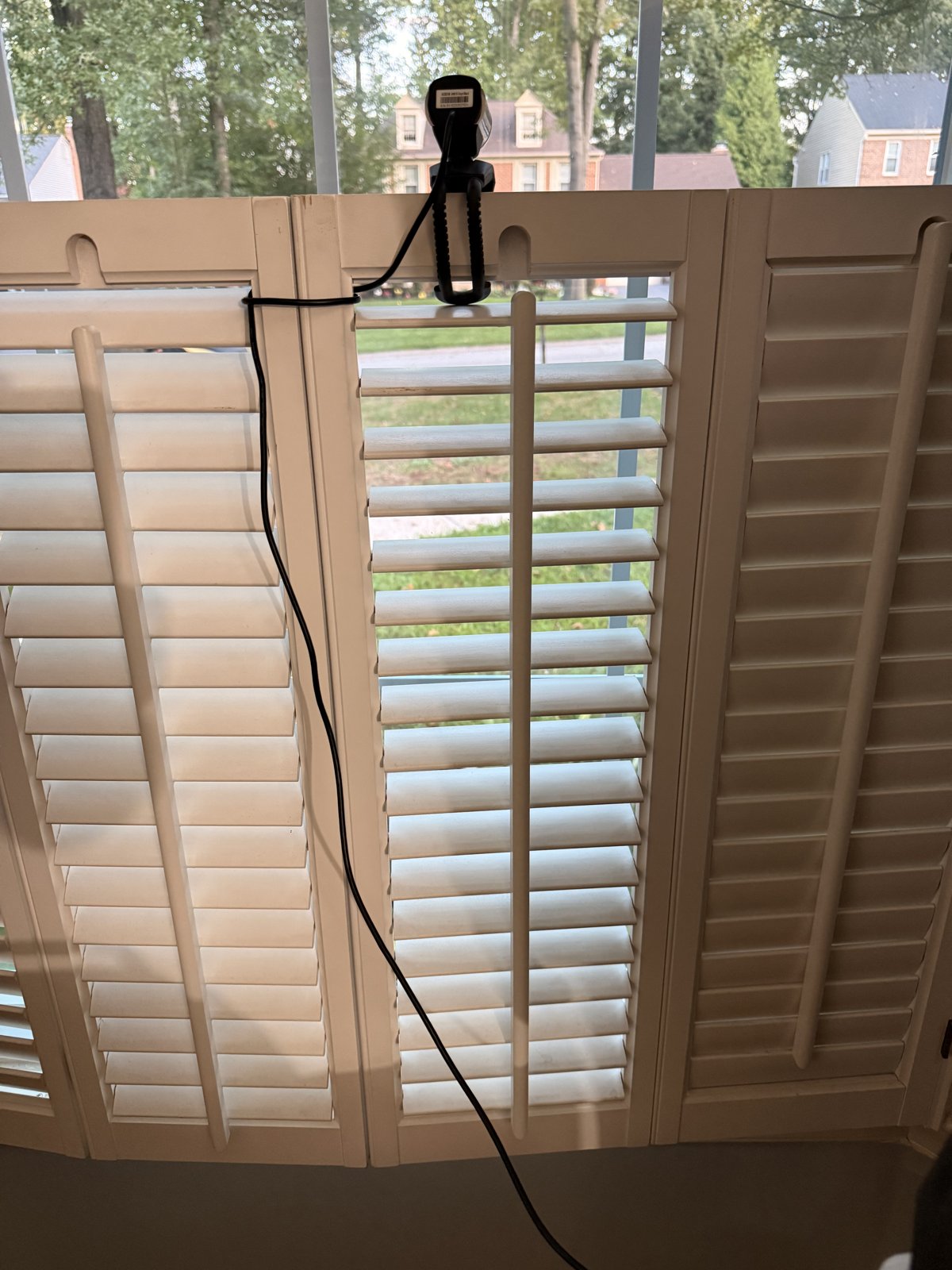
The entire sensor: a clip-on USB webcam clamped to the shutter, looking out at the street. Everything it sees stays on hardware I own.
What I actually built today
The rig is deliberately humble.
- An Arduino UNO Q board sits at my front window with a USB webcam plugged into it.
- The board captures frames, thins them down, and hands them to my MacBook Pro M3 Max. Originally I wanted this on my Always-On Mac Mini but that box already has GPT-OSS-20B running on it and it cant take a vision model as well due to the lack of unified memory on it and that box hosts my Evals that I run on every LLM in my house.
- A vision language model running locally on the Mac looks at each frame and names what it sees: person, vehicle, wildlife.
- I confirm or correct the label. Every confirmed frame becomes part of my own labeled dataset.
No frame leaves the network. The label is auto-drafted by the model, and the human is the final authority. That loop is the entire product.
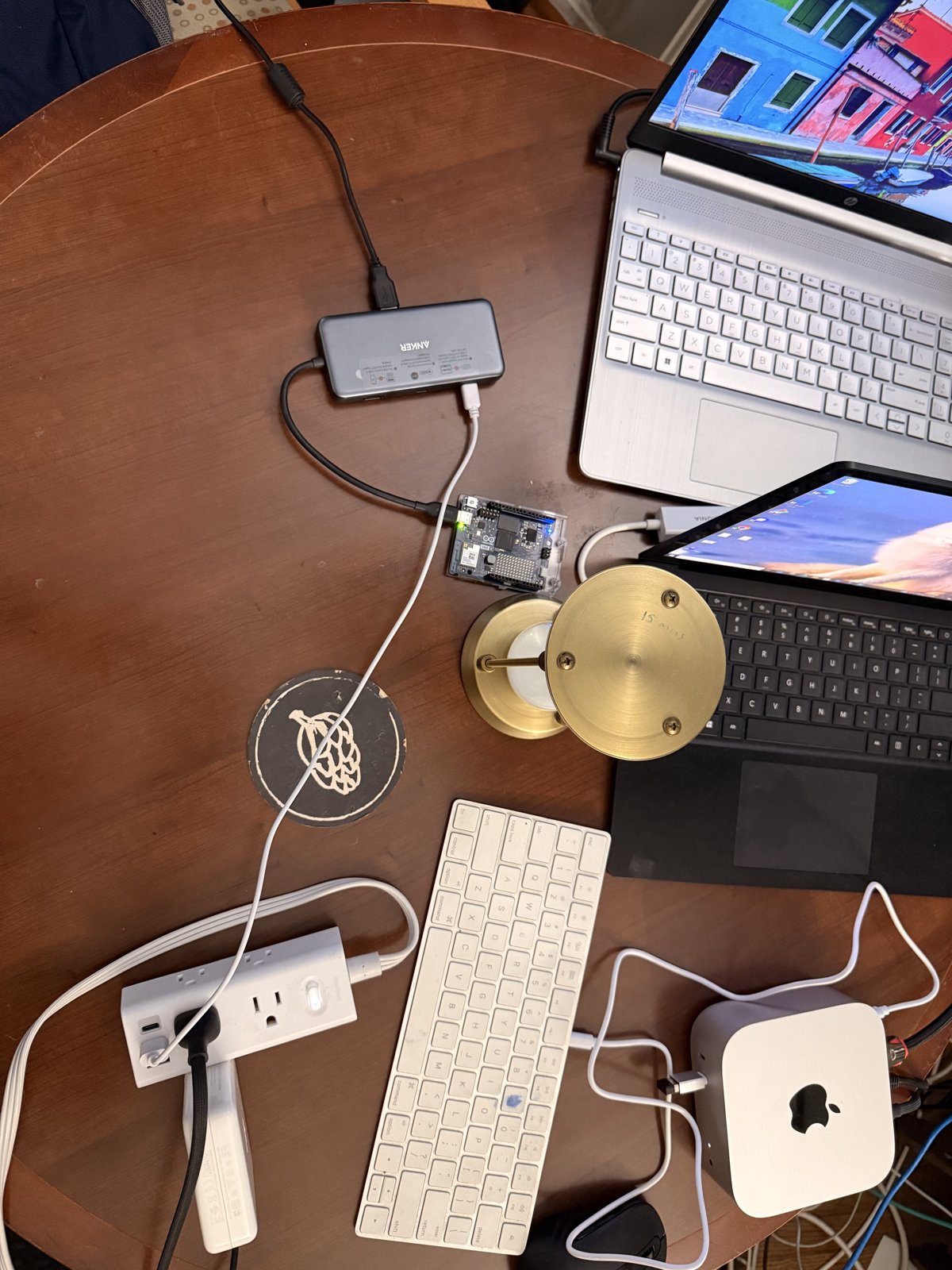
The whole rig on a side table. The Arduino UNO Q sits center on the Anker hub, the always-on Mac mini that guards my evals is bottom right, and yes, that is a lot of cabling for something this small.
The test: I made myself the subject
I did not want a staged demo with a toy object on a table. So I scripted a real 90-second scene and ran it against my own street. I parked on the street, walked up the driveway past the camera, walked back, drove the vehicle in, parked, got out, and walked to the door. Then I let the local model label the whole thing.
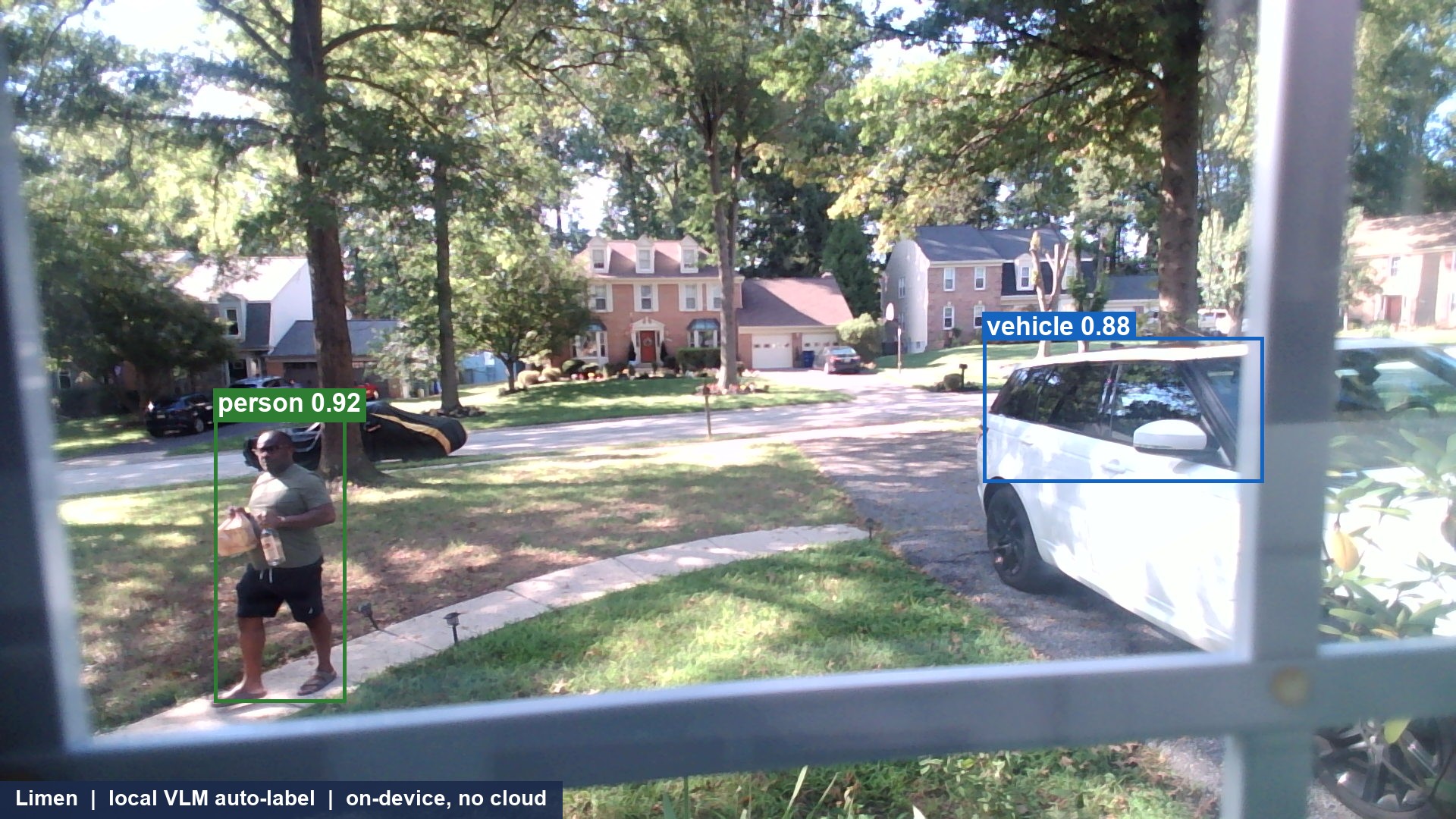
Here is one real frame. That is me on the left, walking up to the door with a bag in one hand and a bottle in the other, with my vehicle on the right, both flagged by the local model. The boxes and the 0.92 style scores are an overlay I drew to make the labels legible; the model itself returns counts and short text descriptions, not bounding boxes (see the model note below). I would rather tell you that than let the picture imply more than the model gave me.
I am comfortable showing my own face and my own vehicle here, so I did. Anything belonging to a neighbor stays non-identifiable, which at this camera distance is already true: you cannot read a plate in this frame if you tried.
The numbers
Every count below came off my own machine, not an estimate.
- 180 frames captured and labeled from the scripted run.
- 180 vehicle detections across the sequence.
- 35 person detections.
- 0 parse failures. Every frame the model looked at returned a label I could use.
- About 8.4 seconds per frame on the local model.
- 0 frames sent to any cloud. That number is the one I care about most.
The model tracked the story correctly: an empty baseline, a person appearing on the right, a vehicle moving up the street, then the vehicle parked. For a first pass on real-world footage shot through a window screen, that held up better than I expected.
The models, for the folks who will ask
This is the first question I would ask too, so here is the whole stack named precisely. Everything that does inference here is one local model.
- Vision and labeling:
Qwen2.5-VL-7B-Instruct, 4-bit quantized, specifically themlx-community/Qwen2.5-VL-7B-Instruct-4bitbuild. - Runtime: MLX, through
mlx-vlm, on the MacBook Pro M3 Max. Apple Silicon unified memory is what lets a 7B vision-language model stay resident and label frame after frame with no GPU server and no cloud endpoint. - What it returns: I prompt it for compact JSON only, never prose: counts of vehicles, persons, and wildlife, a
license_plate_readableboolean, and a short list ofcategory: descriptiondetections. That structure is what makes the output queryable later instead of a wall of text. - Throughput: about 8.4 seconds per frame, single stream, 180 of 180 frames parsed cleanly, 0 failures.
- The honest caveat on that sample image: the colored boxes and the
0.92scores are an overlay I drew. In this POC the model gives me counts and text descriptions, not bounding boxes or calibrated confidences. Real boxes are a next step, either a small detector in front of the VLM or a grounding-capable prompt. - No second model, no cloud hop. The only other local model in the house that touches this at all is the one that deliberately does not: the evals judge on the Mac mini, a resident
gpt-oss-20b, stays walled off from this pipeline on purpose (that is the constraint section below).
So the short version for the skeptics: it is a single Qwen2.5-VL 7B, on 4-bit weights, on a laptop, doing all of the labeling on device.
What did NOT work, and why I am fine with it
This is a beta, and naming the gaps is the point.
License plates are unreadable. I went in wanting plates, and I am not getting them with this camera. It is a fixed wide-angle lens with a manual focus ring, so at street distance a plate is just a smudge. I checked the camera’s own controls from the Mac, and there is no zoom, pan, tilt, or focus to drive in software. Plates are a separate hardware track for later: a tighter varifocal camera outside the glass plus a dedicated plate-reading model. A nice-to-have, not this week.
The frame rate overran the clock. I asked for a 90-second capture and got about 63 seconds of wall time, because the camera ignored my rate cap and delivered frames faster than requested. Easy fix next time: drive the capture by wall clock, not by a frame count.
Neither of these blocks the goal. They are the roadmap.
The one hard constraint that shaped everything
Here is the design decision I am proudest of, and it is a boring one.
On my network there is a Mac mini I call ADA that runs my evals, the automated quality judge that grades the writing and code my agents produce. A lot rides on that rig. It is not allowed to wobble.
The obvious move would have been to run this whole vision system on the always-on mini so it never sleeps. I did the math and killed that idea. The mini is a 16 GB machine, and the evals judge already sits resident at 13.8 GB. Loading a vision model next to it would evict the judge and destabilize evals. Not acceptable, full stop. A new toy does not get to put an existing critical system at risk.
So the architecture bends around evals instead of through them:
- The board is the always-on producer. It captures and ships frames, then wipes itself.
- The Mac mini is the always-on hub. It holds the queue, the small web app I will use to confirm labels, and the archive. It keeps running evals and nothing else heavy.
- The MacBook Pro M3 Max is the intermittent worker. It runs the vision model and drains the queue whenever it is awake.
When the laptop is closed, the backlog just waits on the mini. Nothing is lost, and labels catch up on the next wake. The honest tradeoff is that labels are only as fresh as the last time the laptop was on, and I will pay that price all day to keep evals untouched.
Storage splits the same way, on purpose: the training set lives on the mini, and it is mirrored to an external drive so there is no single point of failure.
Where this goes
Limen is step one. The threshold is just the first surface I own. The forks I can already see:
- A motion trigger on the board’s microcontroller side, so I wake on movement instead of streaming constantly.
- Better optics, when plates become worth reading.
- More of what crosses: packages, wildlife, familiar vehicles. Every new class is a new column in a dataset that is mine.
- Local embeddings and query, so “show me every delivery truck this month” gets answered from my own corpus, on my own hardware, with nothing leaving the house.
Next week I turn this proof of concept into a working loop and write up exactly how I did it. This post is the before. The build is the after.
Own the data. The questions come later, and the answers are already home.
Building in the open, masked where it must be. My own face and vehicle are fair game here; nobody else’s are.