Qui Non Proficit Deficit: Three Months Offline, Two Apps Shipped, and an AI That Runs a Nonprofit
I disappeared from LinkedIn and YouTube for three months. Not burned out — building. Two iOS apps shipped, an autonomous AI assistant running a nonprofit, and a workflow that changed everything. Here's the full story.
TL;DR
I went heads down for about three months — no LinkedIn, no YouTube, barely any Twitter. In that time I shipped two iOS apps to the App Store, built an autonomous AI assistant that runs a nonprofit’s entire digital presence 24⁄7, and developed a workflow where AI agents scale my output 3-5x. This post is the full story: the career pattern that taught me to recognize seismic shifts, what I actually built, and why I’m back.
The Latin Phrase That Drives Everything
A Jesuit teacher named Father Ryan drilled a Latin phrase into me in high school that I’ve carried for decades: qui non proficit deficit.
Most people translate it as “if you don’t move forward, you move backwards.” Close, but it misses the point. The literal meaning is: he who doesn’t advance loses ground. The distinction matters. You don’t have to move backwards to fall behind. You can stand perfectly still while everyone else moves ahead of you.
That distinction has shaped every major decision in my professional and personal life. And it’s why, around August/September of last year, I stopped posting on LinkedIn, went quiet on YouTube, and disappeared from most of the communities I’d been active in for years.
I wasn’t burned out. I was building.
The Career Pattern: Five Steps I’ve Run Five Times
Before I get to the AI stuff, you need context. The playbook I used this time is the same one I’ve used my entire career:
- Master the current domain. Get deep enough that people come to you for answers.
- Give knowledge away for free. Blog posts, conference talks, YouTube videos, code on GitHub. The community remembers who helped them.
- Recognize the seismic shift. Not the trend, not the hype — the structural change that rewrites the rules.
- Build trusted circles. Small groups of people who challenge your thinking and sharpen your judgment.
- Let go of the old thing. This is the hardest one. It’s even hard for me — I am OCD to the bone! But you have to be willing to walk away from the domain you mastered to master the next one. Fortunately, I’ve had people in my professional life who helped me recognize this when I wasn’t ready to see it. Thank you.
The Pivots
The Basement (Walter Reed Army Institute of Research / Walter Reed Army Medical Center (WRAIR/WRAMC))
I moved to the DC metro area to work at Walter Reed Army Institute of Research / Walter Reed Army Medical Center (WRAIR/WRAMC) on a Presidential Decision Directive. Two-plus years in a basement doing work that was genuinely ahead of its time. Nobody saw it, nobody talked about it, but it taught me: important work doesn’t always look impressive from the outside.
BizTalk and the State of Maryland
Enterprise integration before anyone called it that. Learned that connecting systems matters more than building new ones. I wrote a technical proposal, then became a subcontractor to a prime and led a team of 13 people to bring the State of Maryland into HIPAA compliance.
SharePoint and the Business Data Catalog
When Microsoft Office SharePoint Server 2007 (MOSS) shipped, the documentation was — let’s be generous — incomplete. I used JetBrains Reflector to inspect SharePoint’s binaries, figured out how the plumbing actually worked, and wrote a series of blog posts explaining it. Those posts later ended up in the Microsoft Certified Master (MCM) courseware. That’s how I got into the community — by giving knowledge away for free.
That’s also how I met people who changed my career: John Ferringer introduced me to Twitter at a CDW project in Indianapolis. Joel Oleson, Todd Klindt, Shane Young, and Andrew Connell — I met them at a conference in Burlingame when I took a speaking slot for Dr. Joe Shepherd who couldn’t make it.
Every opportunity I had in the SharePoint world traced back to giving away knowledge for free.
The Graph Pivot
Between SharePoint 2013 and 2016, I stopped doing SharePoint on-prem full stack and UX work entirely. I’d gotten deep into state machine workflows bolted onto SharePoint via WCF — with critical help from Bart Tubalinal, who saved me on a project where I’d gotten in over my head.
But I could feel the shift. The future was in the data layer — Microsoft Graph and Xamarin. I pivoted to building mobile experiences surfacing Graph data, then focused exclusively on the middle tier.
By SharePoint Server 2019, I was 100% Graph. That bet paid off for years.
TechEd 2014
I was in the room when Satya Nadella, then VP of Azure, coined “Mobile First, Cloud First.” I felt the tremor. Half the audience heard the words but didn’t feel the shift.
Microsoft MVP, Then Microsoft Employee
I was a 7 times MVP — first in SharePoint Server, then SharePoint Development, also got a Xamarin MVP, then later Azure MVP, and so on and so forth. Then I crossed over and became a PM, working on Jeremy Thake’s newly founded CPx team with Brian T. Jackett. I was the 2nd team member of a team that grew to 9.
This Time the Shift Is Different
Every previous shift was industry-specific. SharePoint to Graph. On-prem to cloud. Mobile to API-first.
The AI shift is different because it’s everything, everywhere, all at once. Not one industry pivoting — the entire world reorganizing how work gets done. And the velocity is unlike anything I’ve experienced.
I started paying attention when Semantic Kernel was still pre-v1. I was fortunate to work with John Maeda and his team early on. Then came the rapid-fire evolution: RAG, plugins, GPTs, MCP, A2A, ACP, agents, OpenClaw. Each one building on the last, each one moving faster than the previous.
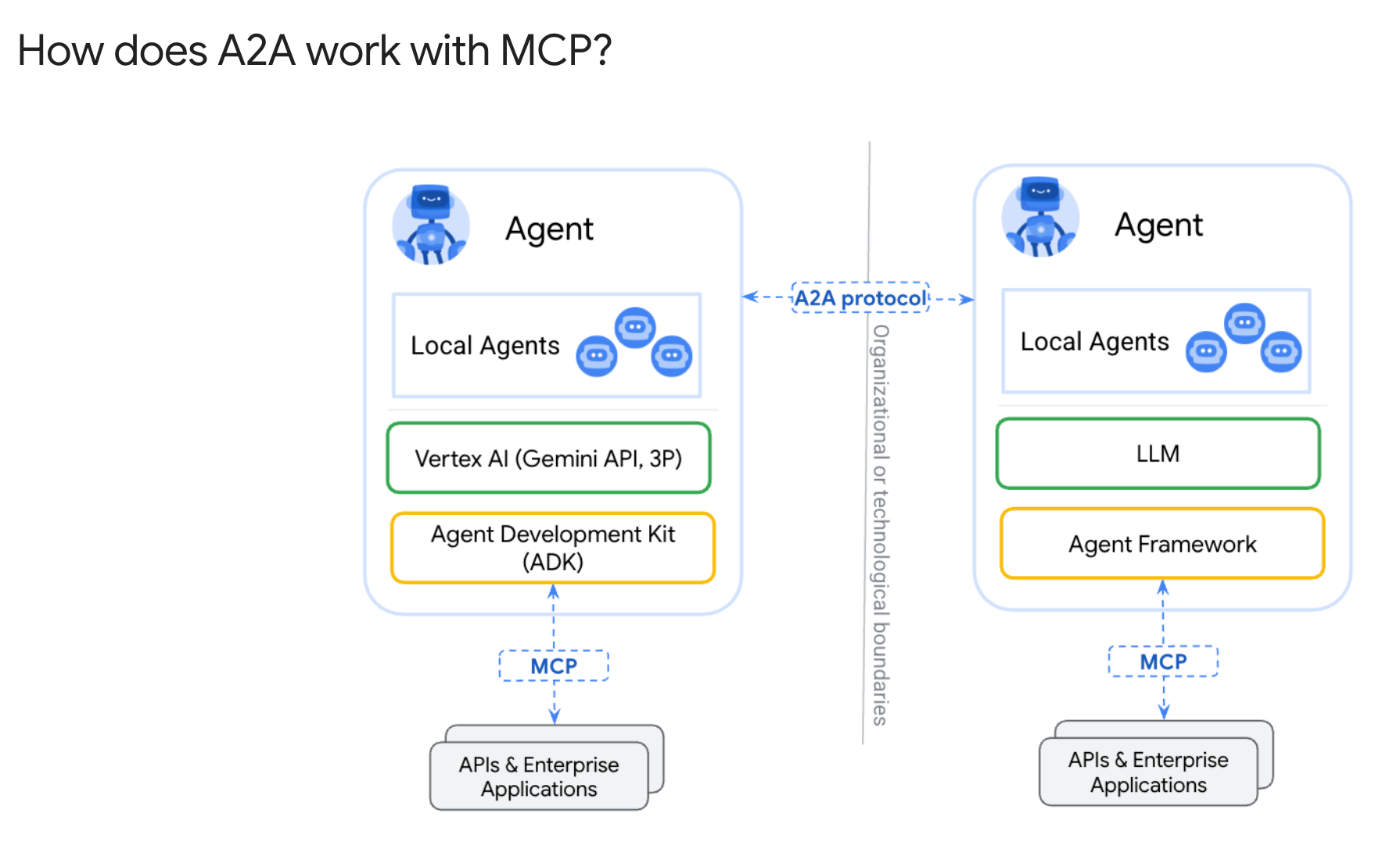
When Anthropic released the Model Context Protocol in December 2024, I knew the game had changed. I even spent over a year debating with my friend Doug Ware about whether MCP was transformative or doomed — we never resolved it, but it made for fantastic intellectual sparring. Then came Agent-to-Agent (A2A) and Agent Communication Protocol (ACP), and suddenly we had a full stack for agents to discover, communicate, and collaborate with each other.
This shift has three dimensions most people only see one of:
For enterprises: How does your company become AI-forward in a way that’s secure, observable, and actually useful?
For small businesses: The pharmacy, the family practice, the volunteer org — they need the productivity gains but can’t afford enterprise AI. This is what I’m building at Adotob.
For individuals: How do you recognize a seismic shift, understand its impact, and adjust before you lose ground?
Going Heads Down
Around December 2025, I made a conscious decision: stop posting and start building. I was spreading myself too thin — YouTube, LinkedIn, conferences, community engagement. All good things, but I was talking more than shipping.
So I went quiet. Three months of focused work. Here’s what came out of it.
What I Built
ConferenceHaven — Three Ways to Talk to a Conference
I started with a problem I knew firsthand. As a conference speaker, I’d often discover that another speaker was covering the same topic in a session scheduled right before or after mine — intro after advanced, or vice versa. Conference organizers don’t always catch these conflicts.
So I built ConferenceHaven: an AI conference assistant that searches thousands of sessions across major conferences. I built it three ways:
- MCP server over HTTP streaming — drops into Claude Desktop, ChatGPT, Copilot Studio, LM Studio with one URL
- Web chat at conferencehaven.com/chat — zero install, works on your phone at the conference
- A2A agent card — so other conference agents can discover and collaborate with it
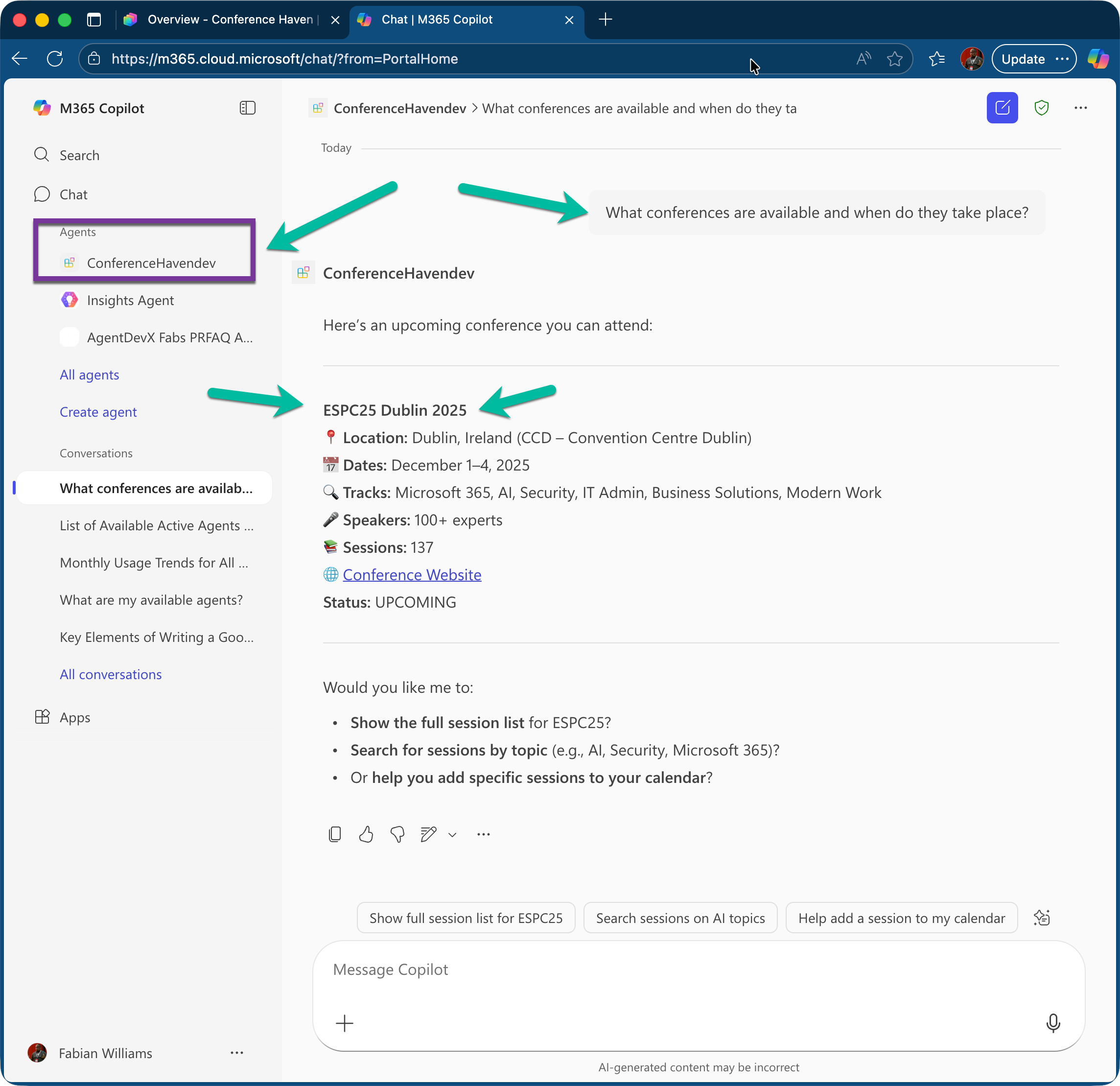
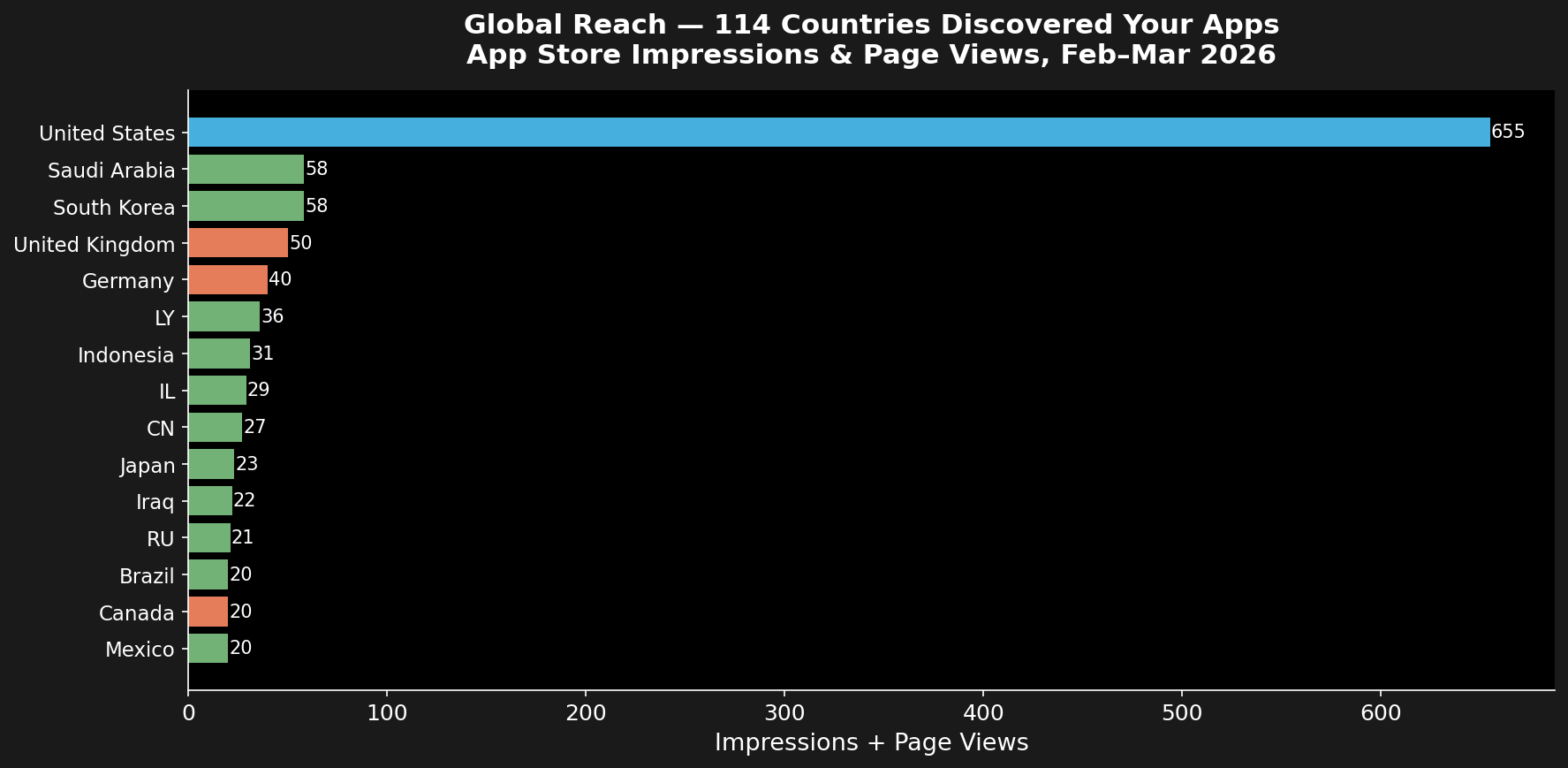
My friend Kevin McDonnell, an MVP from the UK, used it in his Copilot demo at ESPC in Dublin. We debugged it together, wired it into Copilot Studio, and it just worked. MVPBuzz for the win!
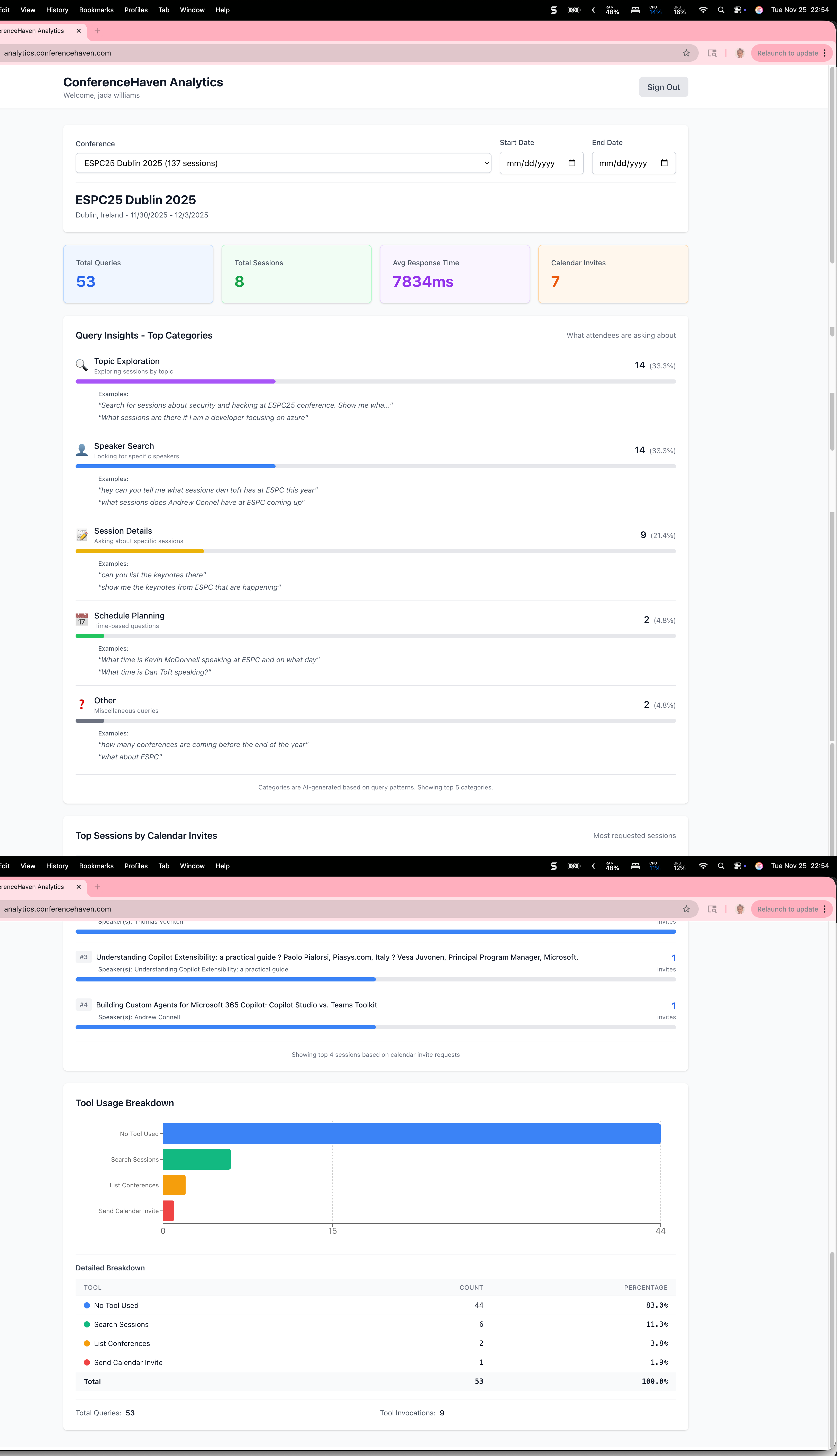
Then I added OpenTelemetry observability — tracking what people ask, running evals, and using the data to improve session recommendations. The same observability patterns I work with at Microsoft, but proven out in a live public system.
Result: 1,500+ sessions indexed. Analytics dashboard live. A2A integration documented. It’s all open source.
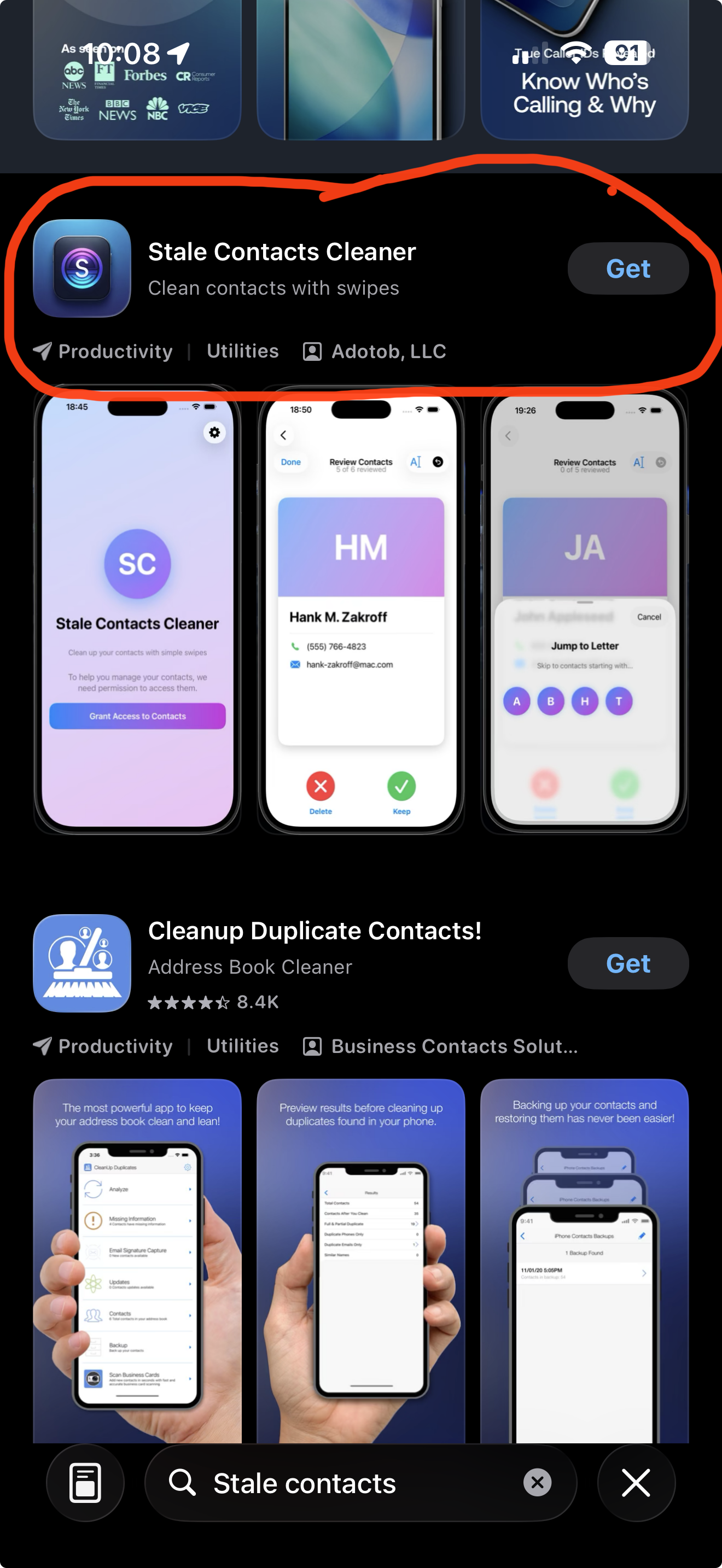
Stale Contacts Cleaner — Idea to App Store in 7 Days
A friend of mine fell victim to a scam. Someone got into an old contact’s compromised phone, found my friend in their contacts, and texted asking for a quick Venmo transfer. The name matched. The context felt right. My friend lost some money that night.
That story hit me because I realized I had hundreds of contacts I hadn’t talked to in years. Every one of them is a trust anchor that could be exploited.
I built Stale Contacts Cleaner in a day and a half. Tinder-style interface — swipe right to keep, left to delete. Everything stays on your iPhone. Zero data collection. Not even analytics. Submitted to the App Store on day two, and after one rejection and a resubmission, it was live.
Total AI cost to build: ~$20. Outsourcing would have been $2,500+.
WandR — An AI Trip Planner Born on a Motorcycle
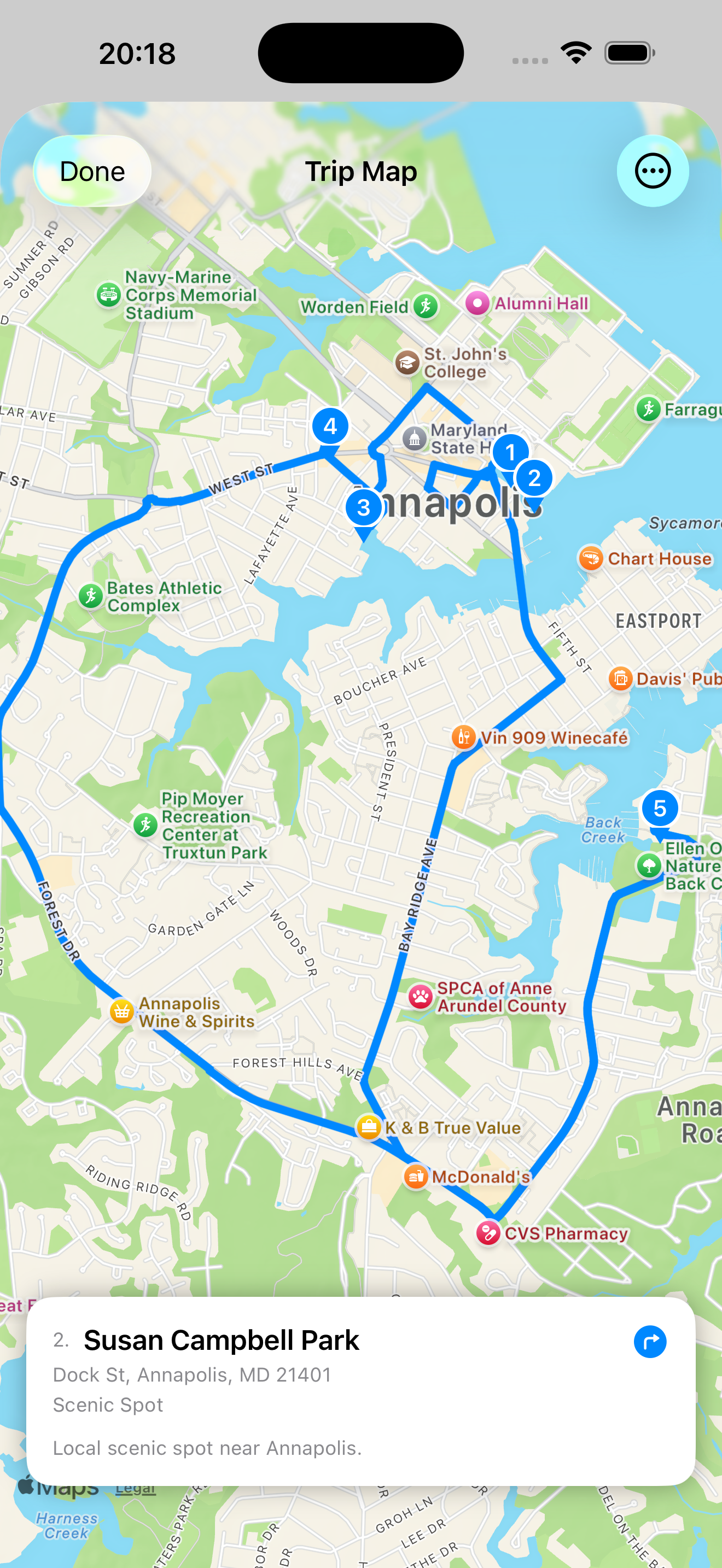
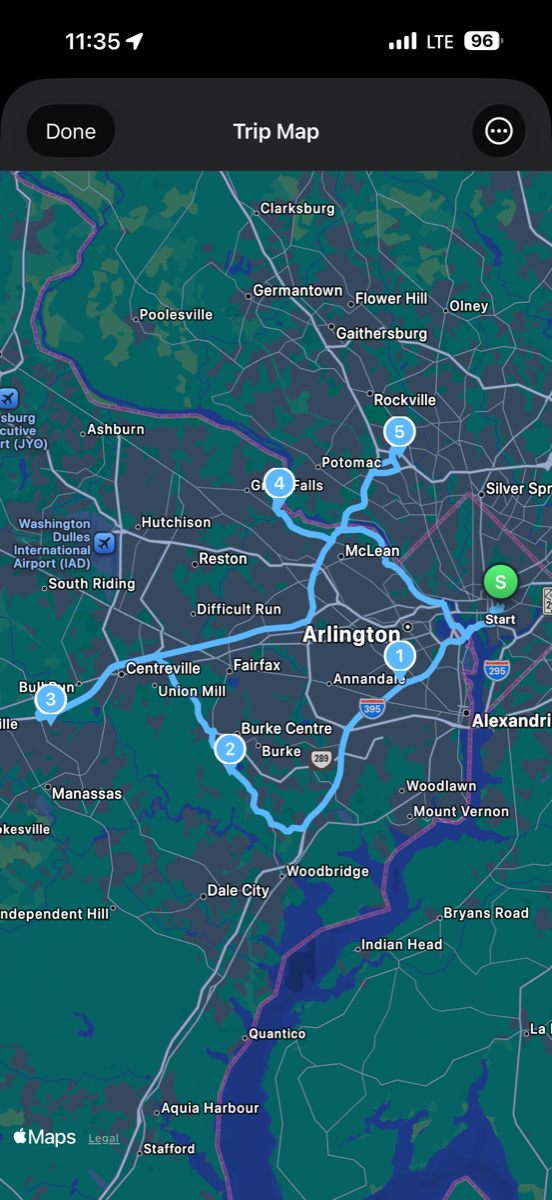
As we were coming out of winter a few weeks ago, I jumped on the motorcycle the first day the weather cracked 50 degrees. Hit Jailbreak Brewing Company in Laurel to get a pint from my favorite bartender who’s been there forever, Allie DeThomas. Then Sapwood Cellars Brewery in Columbia. Then kept riding. Classic pub crawl on a bike.
When I got home, I started thinking: what if instead of picking a destination, you told an AI what you were in the mood for? “Breweries, two hours, motorcycle.” And three AI agents figure out the route, the stops, and the scenic roads. This became even clearer when I went on Reddit, the Ducati subreddit, posted pictures of the bike out and asked people what they were doing that day.
That’s WandR. Three AI agents — Route Planner, Stop Curator, Experience Designer — collaborate on real roads (Apple MapKit, not abstract lines) with curated stops.
Built in two and a half days. SwiftUI frontend, Python/FastAPI backend, Azure Container Apps.
Two apps. Both on the App Store. Under three weeks total. Total AI cost: about $20 each.
MACONA OpenClaw — An Autonomous AI Running a Nonprofit
I volunteer for MACONA.ORG, a 501©(3) nonprofit. All-volunteer staff, no IT department. I’m usually their tech person, but during my time heads-down, I wasn’t helping much. The organization was feeling it.
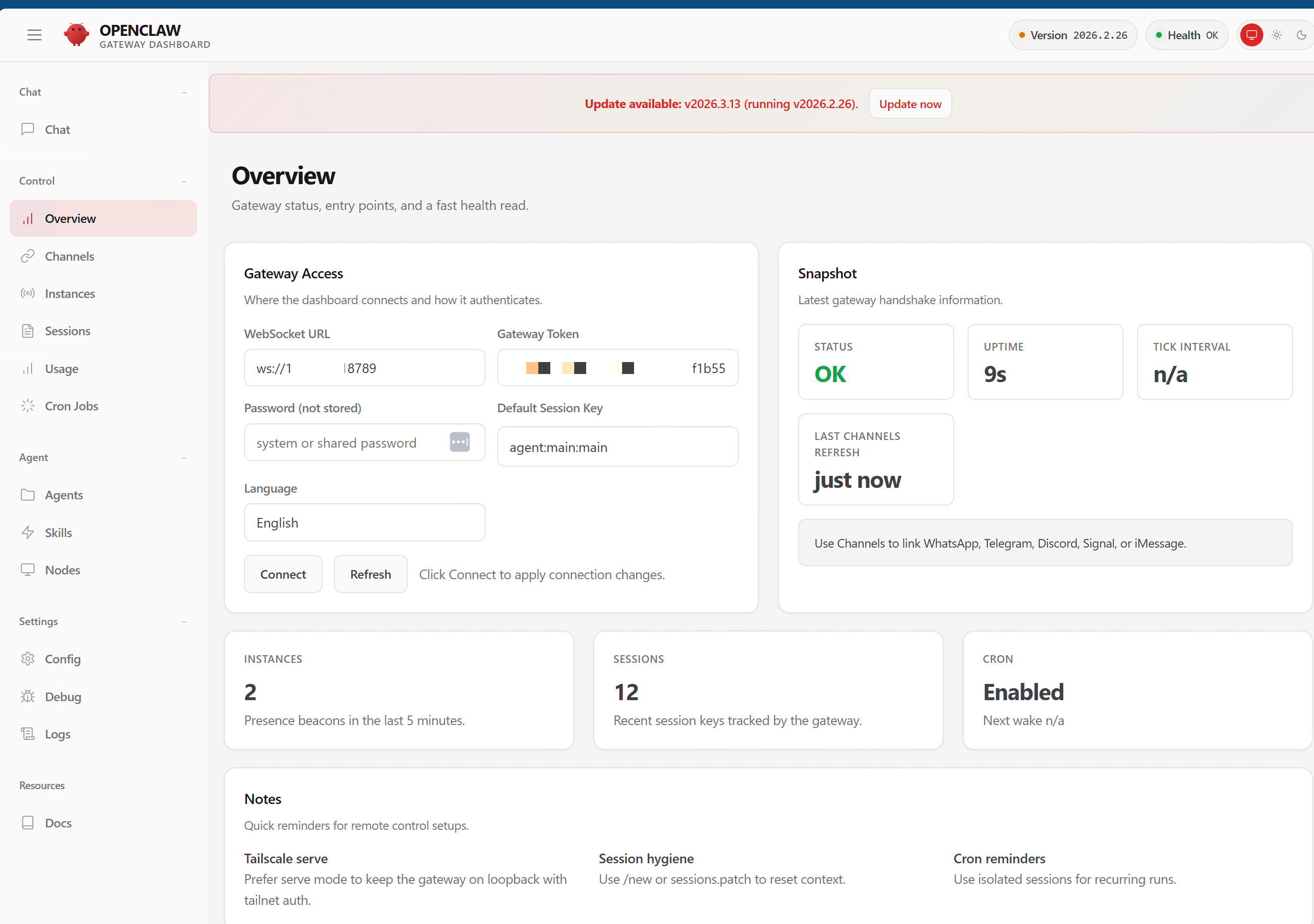
So I set up OpenClaw — an AI assistant running 24⁄7 on dedicated hardware. It manages their WordPress blog, LinkedIn, Twitter, email newsletter, Microsoft 365 email, and calendar. It has standing orders for four autonomous programs — no daily prompts needed. It publishes content, does donor outreach research, runs daily briefings, and triages email.
| Channel | What It Handles |
|---|---|
| WordPress | Drafts and publishes blog posts |
| Social media via Buffer API | |
| Twitter/X | Social media via Buffer API |
| Brevo | Monthly newsletter cycle |
| M365 Email | Inbox triage, daily briefings, send-on-behalf |
| M365 Calendar | Schedule management, time-boxing |
| Signal | Direct communication with staff |
The assistant has its own email address, its own delegate access, and a security model where only internal staff can command it. External emails are read-only — it flags them but never responds without approval.
This isn’t a chatbot. It’s an autonomous agent with standing orders that runs the digital presence of an entire organization. And the same pattern works for any small org — nonprofits, clinics, pharmacies, solo practices. See the OpenClaw service offering on adotob.com.
How I Work Now
My workflow is two windows: Obsidian and a terminal (Ghostty on my Mac, command window at work on my Windows box). The key unlock…
Obsidian is my second brain. Markdown files with YAML frontmatter, organized into a vault that sits on my local hard drive. Properties and wiki-links create a graph — a queryable neural network of everything I know and everything I’m working on. I have separate contexts for personal life, my LLC (Adotob), and my Microsoft work.
The terminal runs Claude Code instances — sometimes three or four at once, each working on a different task. I borrowed from the RalphWiggum way of working (bash loops for autonomous execution) and also from SpecKit’s idea of constitutional workflow: a specification-first approach with quality gates, real integration tests (no mocking), and autonomous execution within guardrails.
I’m also very local-first. My MacBook Pro M3 Max runs DeepSeek, Llama, Phi, and the ChatGPT OSS 120B model locally via Ollama and LM Studio. Cloud models are for production only. Everything else stays on my machine.
The result: I can run parallel workstreams. One Claude instance is doing app marketing via Buffer API. Another is monitoring Reddit for engagement opportunities. A third is building a website. All while I review, approve, and steer from Obsidian.
This isn’t about replacing what I do. It’s about scaling how much I can do. The bottleneck isn’t coding speed — it’s knowing what to build and having the taste to ship something worth using.
You can’t improve what you can’t see. You can’t see what you can’t measure. You can’t measure what you haven’t instrumented. That’s why OpenTelemetry isn’t optional in anything I build.
What I Told My Daughter
My daughter Gabrielle is home from college for spring break. She has one of my old Macs — the beefy one. I installed DeepSeek and GPT-OSS on it and showed her Claude Code.
Not for schoolwork. For life logistics — dorm management, shopping, meal planning, Instacart. The stuff that takes mental energy but doesn’t require human creativity.
She got it immediately. The next generation won’t need to be convinced AI is transformative. They’ll need to be shown how to use it well.
Why I’m Back
Qui non proficit deficit.
I went heads down because I recognized a seismic shift and needed to learn, build, and prove things out before talking about them. I don’t speak on something unless I’ve done it.
Now I’ve done it:
- Two iOS apps shipped to the App Store
- An autonomous AI assistant running a nonprofit
- A conference tool with MCP, A2A, and live analytics
- A workflow that lets me operate at 3-5x my previous output
I’m back because I’m ready to share what I’ve learned. Not theory — working systems with code you can look at, apps you can download, and patterns you can copy.
If you’re still standing still, the ground is moving under you. And if you want help figuring out how to move — whether you’re a developer, a PM, a business owner, or someone who just knows the world is changing and wants to understand how — reach out. I’m always happy to do a one-on-one.
Let’s build.
Cheers, Fabian Williams
Links:
- All Products on adotob.com
- Services & OpenClaw AI Assistants on adotob.com
- Skill Marketplace on adotob.com
- Stale Contacts Cleaner — Free on the App Store
- WandR AI Trip Planner — Free on the App Store
- ConferenceHaven Live Chat
- YouTube
- GitHub Repositories