TL;DR
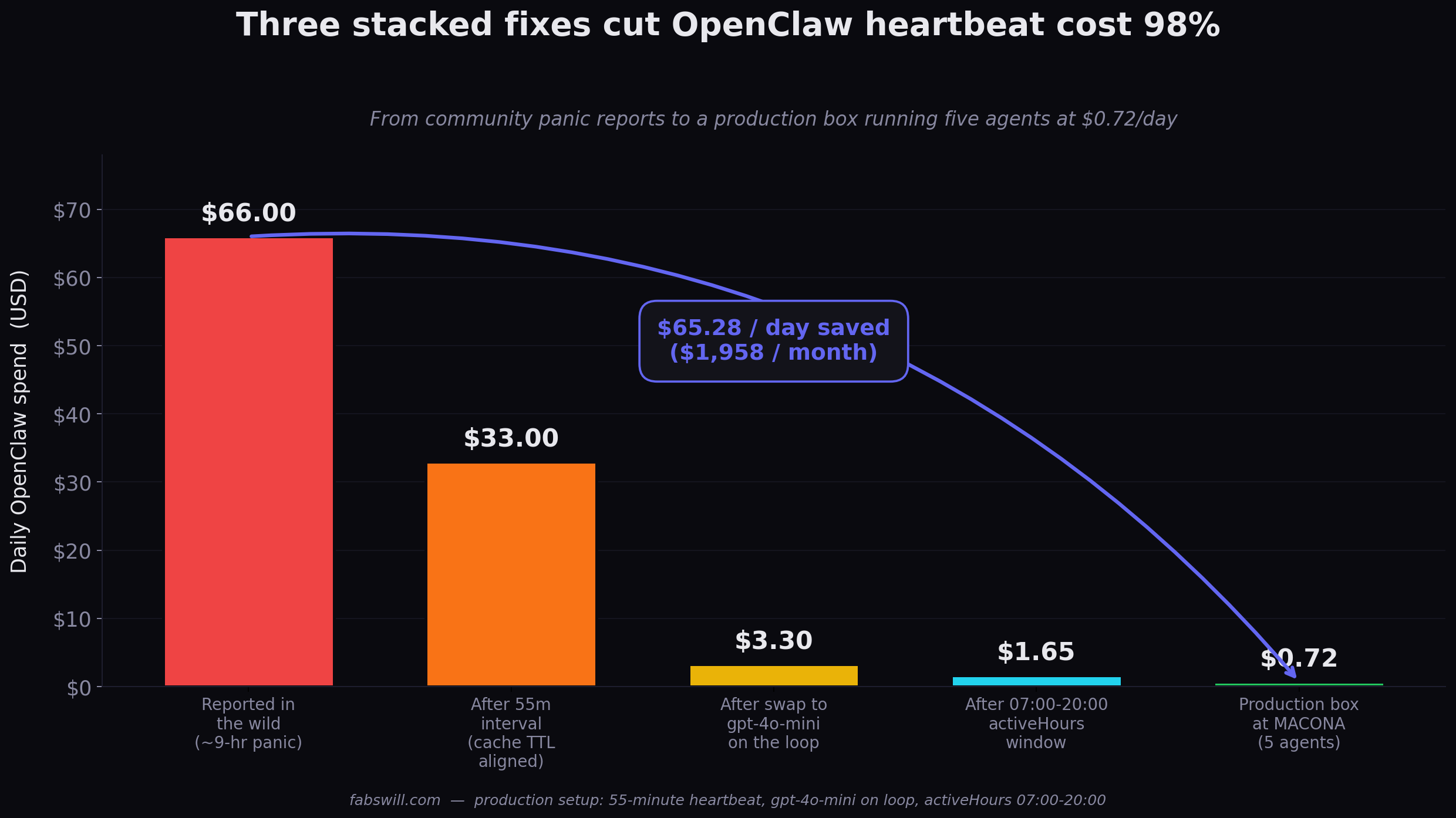
Five OpenClaw agents run the content and executive-assistant pipeline for MACONA — a nonprofit I volunteer with — at $0.72 a day. The most common support question on r/OpenClaw is “$25 in 9 hours, help.” The gap between those two numbers is three config decisions stacked on top of each other: heartbeat interval, model on the loop, and hours of operation. None of them are clever. All of them are usually set wrong by default.
Every 55-minute heartbeat reuses the provider’s cached context. Every 15-minute heartbeat re-pays for it. That single number is half the cost story.
The Panic
The most common OpenClaw support thread I see goes like this. Someone installs the agent on a Friday. They watch their token budget for an hour, decide it is under control, and go to bed. They wake up Saturday morning to $25 burned in 9 hours and a loud conversation with themselves about whether AI agents are a scam.
The comments are split. Half of them say “that is normal, turn it off when you are not using it.” The other half point at three specific things to change. The second half is correct, but the fix is usually buried three scrolls deep and nobody has packaged it.
MACONA — the nonprofit I volunteer with — runs five OpenClaw agents five days a week. Inbox scan, calendar awareness, a content writer, an editor that QAs with Playwright, and an orchestrator that keeps the whole pipeline coordinated. Fourteen-day average cost on the box I set up for them: $0.72 a day. Hard budget cap in the config: $0.75 a day. It has never hit the ceiling.
The difference between $25 in 9 hours and $0.72 in 13 hours is not a secret. It is three decisions.
The Three Stacked Problems
Problem 1: Heartbeat Interval Too Short
Most defaults land somewhere between 5 minutes and 15 minutes. That sounds reasonable. It is not.
Every LLM provider with prompt caching — OpenAI, Anthropic, most of the serious ones — uses a 60-minute cache TTL. If your heartbeat lands inside that window, the agent reuses the cached context. You pay only for the small delta. If your heartbeat lands outside the window, you re-pay for the full prompt every cycle.
Set the interval to 55 minutes. Not 30, not 60, not “every hour.” Fifty-five. That gives you a 5-minute guardrail under the TTL so minor scheduler drift does not blow the cache.
This one change is 40 to 60 percent cost reduction on its own. I was skeptical until I measured it — my before-after was roughly a 50% drop with nothing else changed.
Problem 2: Wrong Model on the Loop
The heartbeat is not a reasoning task. The heartbeat is the agent asking itself “is there anything urgent?” and answering in one sentence. It does not need gpt-4o. It does not need Claude Sonnet. It does not need Haiku 4.5 either for that matter.
Run gpt-4o-mini on the heartbeat loop. Keep gpt-4o (or whatever your main model is) for the actual work — drafting a blog post, running an eval, composing an outbound message. The heartbeat calls do not need it, and when the heartbeat calls are 90% of your daily token spend, picking a 10x cheaper model for that 90% is the single highest-leverage line in your config.
Problem 3: Always-On When You Need 12 Hours a Day
My agents run 7am to 8pm ET, Monday through Friday. That is 65 hours a week of active runtime. A default “always on” config runs 168 hours a week. You are paying for 103 hours of overnight heartbeats that are checking an inbox nobody is writing to and a calendar where nothing is happening.
Set activeHours in the config. Pick whatever window matches how you actually work. For most professionals that is 7am to 8pm. For an e-commerce pipeline it might be 6am to 11pm. For a B2B outbound agent it might be 9am to 5pm plus follow-ups until 7pm. Whatever it is, it is not 24 hours.
The Config
Here is the minimum viable change to your openclaw.json:
"heartbeat": {
  "every": "55m",
  "model": "openai/gpt-4o-mini",
  "activeHours": { "start": "07:00", "end": "20:00" }
}
Three lines. That is the whole fix.
If you also add a hard daily budget cap — "budget": { "dailyUsd": 0.75 } — the agent fails safe instead of silently burning through your card. Which you want, because the day you forget to check the dashboard is always the day something loops.
What My Numbers Actually Look Like
| Setting | Value |
|---|---|
| Heartbeat interval | 55 minutes |
| Loop model | gpt-4o-mini |
| Active window | 07:00 – 20:00 ET, Mon-Fri |
| Hard daily budget cap | $0.75 |
| Number of agents | 5 (Eshe, Kofi, Ama, Ops, Mimi) |
| 14-day average daily spend | $0.72 |
| Main-model escalations per day | ~6 (writer drafting, editor reviewing, campaign sends) |
The main-model escalations are the ones that actually cost money per operation. The heartbeats are basically free at this volume. That is the entire point of the tuning — push the cheap checks to the cheap model, and pay gpt-4o only when you have real work.
What Went Wrong Before I Tuned It
I did not arrive at $0.72 a day on purpose. In early March I had the nonprofit box running on gpt-4o at a 20-minute interval with no activeHours. The first week, I hit the daily budget cap at 11am most days. Agents went dark the rest of the day. Briefs did not ship. The CEO pinged me asking why Mimi had stopped responding.
I fixed it in order of laziness. First I just dropped the interval from 20 minutes to 60. Cost came down but agents were missing short-window events — someone would send an urgent email at 9:05 and the agent would not look until 10:00. Frustrating.
Then I read the prompt-cache TTL docs carefully and saw the 60-minute number. Tightened to 55. Costs dropped another chunk. More importantly, agents felt responsive again because 55 minutes is close enough to “right now” for most nonprofit operations.
Model swap came next. I had been running gpt-4o on the loop because I thought I needed “the smart one.” I was wrong. The loop is not where smart matters. Smart matters in the work the agent does when it decides “yes, there is something urgent.”
activeHours was last because I am personally fine with agents running overnight — but the math said otherwise. Cutting 11 hours of 0-value runtime was the final push from “acceptable” to “cheap.”
Five Lessons, Concretely
- Match your heartbeat interval to the prompt cache TTL, minus a few minutes of slack. Provider cache TTLs are 60 minutes on the big ones. Run at 55m. The single most overlooked number in a default config.
- The heartbeat loop is a triage step, not a reasoning step. Run the smallest model that can reliably say “nothing actionable.” Save the expensive model for the actual work.
- Sleep your agents when you sleep.
activeHoursis a 33-50% savings for zero operational loss if your work does not happen at 3am. - Set a hard daily budget cap in the config, not in the dashboard. Let the agent fail safe. The day you forget to look at the dashboard is the day something loops.
- The cheap fixes stack multiplicatively. Each one is 2-10x cost reduction. Together they are 30-50x. The first one alone usually pays for the coffee you are drinking while you read this post.
Why This Matters Beyond My Box
OpenClaw has roughly 250,000 installs. Most of those installs are on defaults. Most of those defaults are wrong for cost in a way that will not be obvious until the first bill.
I wrote earlier that your next hire should be an AI. The math in that post only works if the agent does not eat its salary in tokens before lunch. The three-line fix in this post is the part that makes the salary math actually work — not just for a well-funded startup but for a nonprofit on a shoestring or a solo operator testing a weekend idea.
I am not writing this because I think OpenClaw is bad. I am writing this because OpenClaw is excellent and the community of people who actually ship production agents with it is growing fast — and the on-ramp is rougher than it needs to be. The three-line fix above is what I would tell a friend over coffee. I would rather it be on the public internet than only in my head.
I packaged the same HEARTBEAT.md template I use on the MACONA box as a free download. It carries all three fixes above plus a customization guide and the per-cycle checklist the agent runs (inbox scan, calendar awareness, task status). Drop it into your workspace, restart the gateway, watch your costs.
Grab the HEARTBEAT.md template →
It comes with four sample configs from our production SDR pipeline in the same zip. No credit card, just your email for the download link. If you eventually want the full bundle — budget caps, e-stop controls, risk scoring, bounce circuit breakers, the whole safety layer that keeps an agent from freelancing with your API keys — that is what the paid tiers buy. The heartbeat template is genuinely free and complete.
Cheers, Fabian Williams
I build autonomous AI agents for a nonprofit in West Africa and a B2B consultancy. If you are running OpenClaw in production and seeing cost numbers that do not match mine, I would like to hear what you are running — happy to compare configs.
- Blog: fabswill.com
- LinkedIn: fabiangwilliams
- Twitter/X: @fabianwilliams